MQTT: ให้ Device คุยกับ Server แบบเบาๆ
MQTT: ให้ Device คุยกับ Server แบบเบาๆ
Branch:
step-05-mqttPhase: Development — Messaging Layer Repo: kangana1024/showkhun-workshop
สวัสดีน้องๆ ทุกคน! วันนี้เราจะมาคุยเรื่องที่เป็น “หัวใจ” ของ IoT เลย นั่นคือ MQTT โปรโตคอลที่ทำให้ sensor ตัวเล็กๆ คุยกับ server ได้แบบเบาและทน — แม้เน็ตจะกระตุกบ้างก็ตาม จุดเด็ดของตอนนี้คือ telemetry ที่มาทาง MQTT จะวิ่งเข้า ingestion path เดียวกันเป๊ะ กับ REST API ที่เราทำตอนที่แล้ว ไม่ต้องเขียน validate/เขียน DB ซ้ำเลย (ง •̀_•́)ง
ก่อนเริ่ม: น้องๆ จะได้อะไรจาก workshop นี้
- เข้าใจ Pub/Sub และทำไม MQTT เหมาะกับ IoT มากกว่า HTTP
- เชื่อม Mosquitto ด้วย Eclipse Paho Go client v1.5.1
- subscribe topic จริง
devices/+/telemetryแล้ว parse device id จาก topic - publish command ไป
devices/{id}/command - ทำ auto-reconnect + re-subscribe ที่ทนเน็ตหลุด
- ป้อน telemetry เข้า ingestion service ตัวเดิม (reuse โค้ดทั้งก้อน)
WHY: ทำไมต้องเป็น MQTT ไม่ใช่ HTTP?
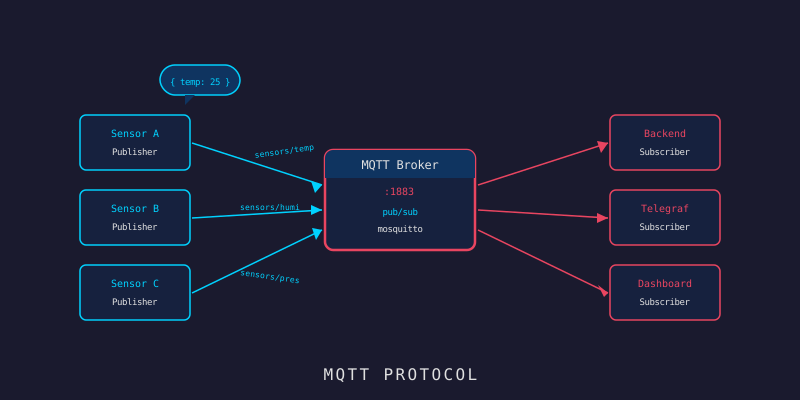
ลองนึกถึง กลุ่ม LINE — ถ้าน้องเคยใช้ ก็เข้าใจ Pub/Sub แล้ว:
- Publisher = คนโพสต์ในกลุ่ม (device ส่งข้อมูล)
- Topic = ชื่อกลุ่ม (เช่น “กลุ่ม telemetry ของ sensor-001”)
- Subscriber = คนในกลุ่มที่รับข้อความ (backend ของเรา)
- Broker = เซิร์ฟเวอร์ที่กระจายข้อความ (Mosquitto)
ความต่างกับ HTTP สำคัญมาก:
HTTP:  [Device] → เปิด connection → ส่ง → ปิด   (ทำใหม่ทุกครั้งที่จะส่ง)
MQTT:  [Device] ── เปิด connection ค้างไว้ ──► Broker ◄── [Server]
                   ส่งได้เรื่อยๆ ไม่ต้องเปิด-ปิดซ้ำ
MQTT ออกแบบมาสำหรับ เครือข่ายไม่เสถียร และ device กินไฟน้อย — เปิด connection ค้างไว้ทีเดียวแล้วส่งได้เรื่อยๆ ประหยัดทั้งแบตและ bandwidth
graph LR
    D1[📡 sensor-001] -->|publish| B[(🪟 Mosquitto)]
    D2[📡 sensor-002] -->|publish| B
    B -->|devices/+/telemetry| S[🖥️ Backend]
    S -->|devices/id/command| B
    B -->|command| D1
Broker เป็น “ตู้ไปรษณีย์กลาง” device ไม่ต้องรู้จัก server โดยตรง และ server ก็ไม่ต้องรู้จัก device โดยตรง — รู้จักแค่ Broker คนเดียว แยกส่วนกันสวยมาก
Topic Structure ของจริง: เรียบแต่พอ
หลาย tutorial ชอบออกแบบ topic ซับซ้อนแบบ iot/{tenant}/{device}/{direction}/{type} แต่ในโค้ดจริงของ workshop นี้เราเลือกความ เรียบง่าย — แค่ 2 รูปแบบ จาก backend/internal/mqtt/client.go:
// telemetryTopicFilter คือ wildcard ที่ backend subscribe
// single-level wildcard (+) จับ segment ของ device id
const telemetryTopicFilter = "devices/+/telemetry"

// commandTopicTemplate คือ topic ที่ publish command ไปหา device
// %s ถูกแทนด้วย device id
const commandTopicTemplate = "devices/%s/command"devices/+/telemetry→ backend subscribe ตัวนี้ตัวเดียว ดักได้ทุก device (+คือ wildcard 1 level)devices/{id}/command→ backend publish command ลงไปหา device ตัวที่เจาะจง
WHY เรียบแบบนี้? ระบบนี้ยังเป็น single-tenant และเราเอา device id เป็นแกนหลัก การมี topic แค่ 2 แบบทำให้ทั้ง subscribe และ parse ง่ายมาก ไม่ต้องเขียน parser ซับซ้อน — ถ้าวันหลังต้อง multi-tenant ค่อย prefix เพิ่มทีหลังได้
จุดที่ละเอียดอ่อนเรื่อง ความปลอดภัย คือ device id เอามาจาก topic ไม่ใช่จาก payload:
// deviceIDFromTelemetryTopic แกะ device id จาก topic แบบ
// "devices/{id}/telemetry" — return false ถ้ารูปแบบไม่ตรง
func deviceIDFromTelemetryTopic(topic string) (string, bool) {
	parts := strings.Split(topic, "/")
	if len(parts) != 3 || parts[0] != "devices" || parts[2] != "telemetry" {
		return "", false
	}
	if parts[1] == "" {
		return "", false
	}
	return parts[1], true
}
เกร็ดความปลอดภัย: device id มาจาก topic ที่ broker ควบคุม ไม่ใช่จาก JSON ที่ device พิมพ์มาเอง — แปลว่า device ตัวหนึ่งจะ “แอบรายงานแทน” device อีกตัวไม่ได้ ฉลาดและกันโกงในตัว
MQTT Client — เชื่อมต่อแบบทนเน็ตหลุด
ทำไมต้อง Auto-Reconnect?
เรามักลืมว่า เครือข่าย IoT ไม่เสถียร device อาจอยู่กลางแจ้ง Wi-Fi ตัดชั่วคราว ถ้า app crash เพราะ connection หลุดก็จบเลย Auto-reconnect คือ “การกดปุ่ม retry อัตโนมัติ” แทนที่เราจะต้องนั่งเฝ้ากดเอง
มาดู client options ของจริง — ใช้ Eclipse Paho Go client v1.5.1 (github.com/eclipse/paho.mqtt.golang):
opts := paho.NewClientOptions().
	AddBroker(cfg.BrokerURL).
	SetClientID(cfg.ClientID).
	SetCleanSession(true).
	SetOrderMatters(false).
	SetKeepAlive(cfg.KeepAlive).
	SetConnectTimeout(cfg.ConnectTimeout).
	SetWriteTimeout(cfg.PublishTimeout).
	// auto-reconnect พร้อม backoff มีเพดาน และ retry การ connect แรก
	// เผื่อ broker ยังไม่พร้อมตอน boot
	SetAutoReconnect(true).
	SetMaxReconnectInterval(cfg.MaxReconnectInterval).
	SetConnectRetry(true).
	SetConnectRetryInterval(5 * time.Second).
	SetOnConnectHandler(c.onConnect).
	SetConnectionLostHandler(c.onConnectionLost)
มี 3 ปุ่มสำคัญที่ทำให้ client นี้ทนทาน:
SetAutoReconnect(true)+SetMaxReconnectInterval— หลุดแล้วต่อใหม่เอง backoff มีเพดาน (default2m)SetConnectRetry(true)— แม้แต่ “การ connect ครั้งแรก” ก็ retry ได้ ถ้า broker ยังไม่ขึ้นตอน backend boot ก็ไม่พังSetOrderMatters(false)— ยอมให้ประมวลผล message แบบไม่เรียงคิว เพื่อ throughput ที่ดีกว่า
Re-subscribe ทุกครั้งที่ต่อใหม่
จุดที่หลายคนพลาดคือ — พอ reconnect แล้ว subscription หายหมด! เราเลยผูก subscribe ไว้ใน OnConnect handler ที่รันทุกครั้งที่ (re)connect:
// onConnect รันทุกครั้งที่ (re)connect สำเร็จ แล้ว (re)subscribe topic telemetry
func (c *Client) onConnect(client paho.Client) {
	c.log.Info("mqtt connected", zap.String("broker", c.cfg.BrokerURL))
	token := client.Subscribe(telemetryTopicFilter, c.cfg.QoS, c.handleMessage)
	go func() {
		// wait นอก goroutine ของ network เพื่อไม่ block loop ของ Paho
		if token.WaitTimeout(c.cfg.ConnectTimeout); token.Error() != nil {
			c.log.Error("mqtt subscribe failed",
				zap.String("filter", telemetryTopicFilter),
				zap.Error(token.Error()),
			)
			return
		}
		c.log.Info("mqtt subscribed",
			zap.String("filter", telemetryTopicFilter),
			zap.Uint8("qos", c.cfg.QoS),
		)
	}()
}
Tip: สังเกตว่าเรา
WaitTimeoutใน goroutine แยก ไม่ block ใน callback ของ Paho โดยตรง — กฎเหล็กของ Paho คือ “อย่า block callback นาน” ไม่งั้น network loop จะค้าง
ส่วน QoS เลือกผ่าน config (default 1 = At Least Once) เปรียบเทียบง่ายๆ:
QoS 0 (At Most Once)  — โยนกระดาษข้ามห้อง ไม่ถึงก็ช่างมัน (telemetry ถี่ๆ)
QoS 1 (At Least Once) — ส่ง LINE แล้วรอ tick เขียว อาจซ้ำ แต่ถึงแน่ (default)
QoS 2 (Exactly Once)  — ส่ง EMS เซ็นรับ ช้าสุดแต่แม่นสุด (critical command)
Telemetry Processor — ป้อนเข้า Ingestion Path เดิม
นี่คือพระเอกของตอนนี้ เมื่อ message เข้ามา client เรียก processor ที่ “บางมาก” — แค่ decode JSON แล้วป้อนเข้า ingestion service ตัวเดียวกับ REST จาก backend/internal/mqtt/processor.go:
// Ingester คือ subset ของ sensor service ที่ processor ต้องใช้
// มันคือ ingestion path เดียวกับที่ REST API ใช้ — MQTT กับ HTTP
// จึง validate และเก็บข้อมูลแบบเดียวกันเป๊ะ
type Ingester interface {
	Ingest(ctx context.Context, r model.SensorReading) error
}

// telemetryPayload คือรูป JSON บนสาย — device id เอามาจาก topic
// ไม่ใช่ payload ดังนั้น device แอบรายงานแทนตัวอื่นไม่ได้
type telemetryPayload struct {
	Fields    map[string]float64 `json:"fields"`
	Tags      map[string]string  `json:"tags"`
	Timestamp *string            `json:"timestamp"`
}
ตัว handler ทำงานครบ loop แต่สั้นมาก:
// HandleTelemetry parse payload, ประกอบ SensorReading ที่ผูกกับ deviceID
// (จาก topic) แล้ว ingest
func (p *TelemetryProcessor) HandleTelemetry(ctx context.Context, deviceID string, payload []byte) error {
	if len(payload) > maxTelemetryPayload { // 64 KiB กัน memory ระเบิด
		return fmt.Errorf("telemetry payload too large: %d bytes", len(payload))
	}

	var tp telemetryPayload
	if err := json.Unmarshal(payload, &tp); err != nil {
		return fmt.Errorf("decode telemetry: %w", err)
	}

	reading := model.SensorReading{
		DeviceID: deviceID, // ← จาก topic เท่านั้น
		Fields:   tp.Fields,
		Tags:     tp.Tags,
	}
	if tp.Timestamp != nil {
		ts, err := parseTimestamp(*tp.Timestamp)
		if err != nil {
			return fmt.Errorf("parse timestamp: %w", err)
		}
		reading.Timestamp = &ts
	}

	// validate ชุดเดียวกับที่ REST handler ใช้
	if err := validate.Struct(reading); err != nil {
		return fmt.Errorf("invalid telemetry: %w", err)
	}

	return p.ingester.Ingest(ctx, reading)
}
นี่คือความสวยงามของ design: เราไม่ได้เขียน “เช็ค device / สร้าง point / เขียน InfluxDB” ใหม่เลย — แค่แปลง MQTT message เป็น
SensorReadingแล้วโยนเข้าIngestตัวเดิม validation, registry check, blocking write ทุกอย่างที่ทำใน workshop ตอนที่แล้ว reuse ได้หมด เหมือนรถสองคันใช้เครื่องยนต์ตัวเดียวกัน
นอกจากนี้ยังมี maxTelemetryPayload = 64 KiB กัน device ที่ buggy/ประสงค์ร้ายส่ง payload ยักษ์มาทำ memory พัง
ส่ง Command กลับไปหา Device
device ไม่ได้คุยทางเดียว — เราสั่งมันกลับได้ ผ่าน REST endpoint POST /devices/:id/commands ที่ภายในไป publish MQTT จาก backend/internal/handler/command.go:
// CommandRequest คือ payload สำหรับสั่ง command
type CommandRequest struct {
	Action  string         `json:"action"  validate:"required,min=1,max=64,alphanumdash"`
	Payload map[string]any `json:"payload" validate:"omitempty"`
}

// Publish จัดการ POST /devices/:id/commands
// เช็คว่า device มีจริงก่อน แล้วค่อย publish ไป command topic ของมัน
func (h *CommandHandler) Publish(c *fiber.Ctx) error {
	var req CommandRequest
	if err := c.BodyParser(&req); err != nil {
		return httpx.Error(c, fiber.StatusBadRequest, "invalid JSON body")
	}
	if err := validate.Struct(req); err != nil {
		return writeValidationError(c, err)
	}

	dev, err := h.devices.GetByID(c.UserContext(), c.Params("id"))
	if err != nil {
		// ... map ErrNotFound → 404, ErrInvalidInput → 400 ...
	}

	payload, _ := json.Marshal(fiber.Map{
		"action":  req.Action,
		"payload": req.Payload,
	})

	if err := h.publisher.Publish(dev.DeviceID, payload); err != nil {
		return httpx.Error(c, fiber.StatusBadGateway, "failed to publish command to device")
	}
	return c.Status(fiber.StatusAccepted).JSON(fiber.Map{
		"data": fiber.Map{"device_id": dev.DeviceID, "action": req.Action, "status": "published"},
	})
}
ฝั่ง client การ publish ก็ตรงไปตรงมา เช็คว่าต่ออยู่ไหมก่อน แล้วยิงด้วย timeout:
// Publish ส่ง command payload ไปยัง command topic ของ device ตัวนั้น
func (c *Client) Publish(deviceID string, payload []byte) error {
	if !c.client.IsConnected() {
		return fmt.Errorf("mqtt publish: client not connected")
	}
	topic := fmt.Sprintf(commandTopicTemplate, deviceID) // devices/{id}/command
	token := c.client.Publish(topic, c.cfg.QoS, false, payload)
	if !token.WaitTimeout(c.cfg.PublishTimeout) {
		return fmt.Errorf("mqtt publish: timed out after %s", c.cfg.PublishTimeout)
	}
	if err := token.Error(); err != nil {
		return fmt.Errorf("mqtt publish: %w", err)
	}
	return nil
}
Mosquitto Configuration
เราใช้ eclipse-mosquitto:2.0.22 ใน docker-compose config จริงอยู่ที่ infra/mosquitto/mosquitto.conf:
# Persist retained messages และ queued QoS 1/2 ข้าม restart
persistence true
persistence_location /mosquitto/data/

# log ออก stdout เพื่อให้ docker compose logs mosquitto เห็น activity
log_dest stdout
log_type error
log_type warning
log_type notice
log_type information

# MQTT listener มาตรฐาน
listener 1883
protocol mqtt

# WebSocket listener เผื่อ MQTT client ในเบราว์เซอร์ตอน workshop
listener 9001
protocol websockets

# ยอมให้ต่อโดยไม่ต้องมี credential (dev เท่านั้น!)
allow_anonymous true
คำเตือน:
allow_anonymous trueใช้ได้แค่ใน dev เพื่อความ friction-free! Production ต้องปิดแล้วใส่ password file หรือ TLS listener ไม่งั้นใครก็ต่อได้ (°ロ°)!
การ config ใน backend ทำผ่าน env ทั้งหมด (backend/.env.example):
APP_MQTT_ENABLED=true
APP_MQTT_BROKER_URL=tcp://localhost:1883
APP_MQTT_CLIENT_ID=showkhun-backend
APP_MQTT_QOS=1
APP_MQTT_KEEP_ALIVE=30s
APP_MQTT_CONNECT_TIMEOUT=10s
APP_MQTT_MAX_RECONNECT_INTERVAL=2m
APP_MQTT_PUBLISH_TIMEOUT=5s
ถ้าตั้ง APP_MQTT_ENABLED=false backend จะไม่ดัล broker เลย — สะดวกมากตอนทำ deployment แบบ REST-only หรือตอนรันเทส
การประกอบร่างใน main.go
MQTT subsystem เสียบเข้ามาแบบ optional ใน backend/cmd/server/main.go:
var mqttClient *mqttx.Client
if cfg.MQTT.Enabled {
	// processor ใช้ sensorService ตัวเดียวกับ REST — ingestion path เดียวกัน
	processor := mqttx.NewTelemetryProcessor(sensorService)
	mqttClient = mqttx.New(cfg.MQTT, log, processor)
	if err := mqttClient.Connect(); err != nil {
		log.Warn("initial mqtt connect failed; will keep retrying", zap.Error(err))
	}
} else {
	log.Info("mqtt disabled by configuration")
}

if mqttClient != nil {
	deps.MQTT = mqttClient
	deps.CommandHandler = handler.NewCommandHandler(deviceService, mqttClient)
}
เห็นไหมครับว่า processor := mqttx.NewTelemetryProcessor(sensorService) — เอา sensorService ตัวเดิมจากตอนที่แล้วมาเสียบเลย ไม่มีอะไรซ้ำซ้อน
ทดสอบด้วย mosquitto-clients
ก่อนรัน backend จริง เราลองผ่าน command line ได้เลย เหมือน curl แต่สำหรับ MQTT:
# ติดตั้ง client
brew install mosquitto          # macOS
apt install mosquitto-clients   # Linux

# Subscribe ดู telemetry ของทุก device
mosquitto_sub -h localhost -p 1883 -t "devices/+/telemetry" -v

# ส่ง telemetry จาก device จำลอง (device id อยู่ใน topic)
mosquitto_pub -h localhost -p 1883 \
  -t "devices/sensor-temp-001/telemetry" \
  -m '{ "fields": { "temperature": 29.3, "humidity": 72.1 }, "tags": { "location": "room-a" } }'

# ดู command ที่ backend ส่งลงมาหา device
mosquitto_sub -h localhost -p 1883 -t "devices/sensor-temp-001/command" -v

# สั่ง command ผ่าน REST (backend จะ publish ลง devices/{id}/command ให้)
curl -X POST http://localhost:3000/api/v1/devices/sensor-temp-001/commands \
  -H "Content-Type: application/json" \
  -d '{ "action": "reboot", "payload": { "delay_seconds": 5 } }'
ถ้าทุกอย่างถูก น้องจะเห็น telemetry ที่ publish ไหลเข้า InfluxDB ผ่าน path เดิม และ command เด้งโผล่ใน terminal ที่ subscribe devices/sensor-temp-001/command อยู่
  .--.
 |o_o |   "เราคือ sensor จำลอง
 |:_/ |    แต่ข้อมูลที่ส่งไปวิ่งเข้า pipeline จริง!"
//   \ \
(|     | )
สรุป: วันนี้เราทำอะไรไปบ้าง
| ส่วนประกอบ | รายละเอียด |
|---|---|
| Library | Eclipse Paho Go client v1.5.1 |
| Broker | eclipse-mosquitto:2.0.22 (dev: allow_anonymous) |
| Subscribe | devices/+/telemetry (+ จับ device id) |
| Publish | devices/{id}/command |
| Device id source | จาก topic ไม่ใช่ payload — กันแอบรายงานแทนตัวอื่น |
| Reliability | auto-reconnect + connect-retry + re-subscribe ใน OnConnect |
| QoS | config ได้ (default 1 = At Least Once) |
| Ingestion | reuse sensorService.Ingest ตัวเดียวกับ REST 100% |
| Safety | จำกัด payload 64 KiB, publish มี timeout |
หัวใจของตอนนี้คือ “reuse ไม่ rewrite” — MQTT แค่เป็นอีกประตูที่เปิดเข้า ingestion path เดิม ทำให้ทั้ง REST และ MQTT พฤติกรรมเหมือนกันเป๊ะ ดูแลที่เดียวจบ
Next Step
ตอนนี้ device ส่งข้อมูลเข้า backend ได้แล้วทั้ง REST และ MQTT ขั้นต่อไปคือทำให้ Dashboard เห็นข้อมูล real-time โดยไม่ต้อง refresh — นั่นคือเรื่องของ WebSocket ที่จะ fan-out telemetry สดๆ ไปทุกหน้าจอที่ subscribe ไว้
Navigation
- ก่อนหน้า: IoT Workshop #7: Sensor Data Ingestion
- ถัดไป: IoT Workshop #9: WebSocket Real-time
- แผนการ Workshop ทั้งหมด: IoT Workshop Master Plan