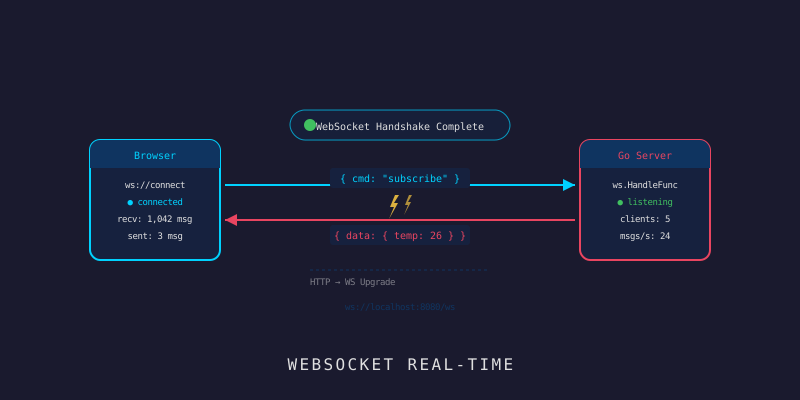
WebSocket Real-time: ดูข้อมูล IoT แบบสดๆ
WebSocket Real-time: ดูข้อมูล IoT แบบสดๆ
Branch:
step-06-websocketPhase: Development — Real-time Layer Repo: kangana1024/showkhun-workshop
น้องๆ เคยเห็น dashboard ที่ค่าอุณหภูมิอัปเดตเองแบบสดๆ โดยไม่ต้องกด refresh ไหม? นั่นแหละ WebSocket! วันนี้เราจะมาทำให้ telemetry ที่ device ส่งเข้ามา (ผ่าน REST/MQTT ที่ทำไว้สองตอนก่อน) fan-out ไปทุกหน้าจอที่กำลังดูอยู่ ทันทีที่ข้อมูลถูกเก็บลง DB มาลุยกัน (ノ◕ヮ◕)ノ*:・゚✧
เกร็ดของจริง: Hub ในโค้ดนี้ใช้แนวคิดที่แตกต่างจาก tutorial ทั่วไป — มันรันบน goroutine เดียว ที่เป็นเจ้าของ state ทั้งหมด (map ของ client/room) แปลว่าบน hot path ไม่ต้องใช้ mutex lock เลย เดี๋ยวจะอธิบายว่าทำไมมันถึงทั้งเร็วและปลอดภัยกว่า
ก่อนเริ่ม: น้องๆ จะได้อะไรจาก workshop นี้
- เข้าใจว่าทำไม WebSocket ดีกว่า HTTP polling (WHY ก่อน HOW)
- Hub pattern แบบ single-goroutine ที่ไม่ต้อง lock บน hot path
- Room system ให้ client subscribe เฉพาะ
device:/group:ที่สนใจ - Fan-out telemetry จาก ingestion path ไปยัง client ที่ subscribe
- จัดการ heartbeat ด้วย ping/pong และ deadline
- back-pressure: ตัด client ที่ช้าทิ้ง กันไม่ให้ลากระบบล่ม
WHY: ทำไมต้อง WebSocket ไม่ใช่ Polling?
ลองนึกว่าน้องโทรหาเพื่อนทุก 1 วินาทีเพื่อถามว่า “มีข่าวอะไรไหม?” — นั่นคือ HTTP polling มันทำงานได้ แต่สิ้นเปลืองสุดๆ:
HTTP Polling (แบบเดิม):
Client → "มีข้อมูลไหม?" → Server → "ยัง"   (ทุก 1 วิ)
Client → "มีข้อมูลไหม?" → Server → "ยัง"   (ทุก 1 วิ)
Client → "มีข้อมูลไหม?" → Server → "มีแล้ว!" (ทุก 1 วิ)

WebSocket (แบบใหม่):
Client ── เชื่อมต่อครั้งเดียว ──────────────── Server
       ←←← ข้อมูลมาถึงเมื่อไหร่ ก็ push ทันที ←←←
WebSocket เหมือน โทรหากันแล้วไม่วางสาย ทั้งสองฝั่งส่งหากันได้ตลอด ไม่ต้องต่อสายใหม่ ผลคือ latency ต่ำลง, CPU ลดลง, UX ดีขึ้นมาก
graph LR
    D[📡 Device] -->|REST/MQTT| I[SensorService.Ingest]
    I -->|เขียน| DB[(InfluxDB)]
    I -->|fanOut| H[WebSocket Hub]
    H -->|device:room| C1[🖥️ Dashboard A]
    H -->|group:room| C2[📱 Dashboard B]
Hub Pattern แบบ Single-Goroutine (อธิบายแบบภาษาคน)
ลองนึกถึง พนักงานต้อนรับคนเดียว ที่จดทุกอย่างไว้ในสมุดของตัวเองคนเดียว:
- Hub = พนักงานต้อนรับ ที่รู้ว่าใครอยู่ห้องไหน
- Client = แขกแต่ละคน
- Room = ห้องประชุม (
device:sensor-001,group:building-a) - Broadcast = ประกาศเข้าห้องที่ตรงกัน → เรียกว่า fan-out
จุดสำคัญที่ออกแบบไว้ฉลาดคือ — มีพนักงานคนเดียวเป็นเจ้าของสมุด ใครจะแก้ข้อมูล (เพิ่ม client, เข้าห้อง, broadcast) ต้อง “ส่งโน้ตให้พนักงานคนนี้” ผ่าน channel แล้วเขาทำให้ทีละอย่าง — ไม่มีใครแย่งกันเขียนสมุดพร้อมกัน เลยไม่ต้องล็อกอะไรเลย
มาดู struct ของ Hub จาก backend/internal/ws/hub.go:
// Hub เป็นเจ้าของ set ของ client และ index ของ room membership
// การแก้ไขทั้งหมดเกิดบน goroutine ของ run loop ผ่าน channel
// register/unregister/broadcast
type Hub struct {
	log *zap.Logger

	// rooms map ชื่อห้อง → set ของ client ที่ subscribe ห้องนั้น
	rooms map[string]map[*Client]struct{}
	// clients คือ set ของ client ที่ต่ออยู่ทั้งหมด
	clients map[*Client]struct{}

	register    chan *Client
	unregister  chan *Client
	broadcast   chan envelope
	subscribe   chan subscription
	unsubscribe chan subscription
	query       chan roomQuery
	done        chan struct{}
}
หัวใจคือ event loop ที่ select รับงานจาก channel ทีละอย่าง:
// Run คือ event loop ของ hub return เมื่อ Stop ถูกเรียก
func (h *Hub) Run() {
	for {
		select {
		case c := <-h.register:
			h.clients[c] = struct{}{}

		case c := <-h.unregister:
			h.removeClient(c)

		case s := <-h.subscribe:
			room := h.rooms[s.room]
			if room == nil {
				room = make(map[*Client]struct{})
				h.rooms[s.room] = room
			}
			room[s.client] = struct{}{}
			s.client.rooms[s.room] = struct{}{}

		case s := <-h.unsubscribe:
			h.leaveRoom(s.client, s.room)

		case env := <-h.broadcast:
			for c := range h.rooms[env.room] {
				h.deliver(c, env.data)
			}

		case <-h.done:
			for c := range h.clients {
				close(c.send)
			}
			return
		}
	}
}
WHY single-goroutine? เพราะทุกการอ่าน/เขียน map เกิดบน goroutine เดียวกัน เราเลย ไม่ต้องใช้ mutex บน hot path เลย — ไม่มี lock contention, ไม่มี deadlock, ไม่มี race ทุก mutation ถูกทำให้เป็นคิวอัตโนมัติด้วย channel นี่คือสไตล์ Go แท้ๆ: “share memory by communicating”
Back-pressure: ตัด Client ช้าทิ้ง
ปัญหาคลาสสิกของ fan-out คือ — ถ้ามี client เน็ตอืดคนหนึ่งรับไม่ทัน มันจะถ่วงให้ทุกคน “รอ” ด้วยกัน Hub นี้แก้ด้วย deliver ที่ใช้ non-blocking send:
// deliver ดัน data เข้า send buffer ของ client client ที่ buffer เต็ม
// ถือว่า "ช้าเกินไป" แล้วตัดทิ้ง เพื่อปกป้อง hub — back-pressure จาก
// client ช้าตัวเดียวต้องไม่ทำให้ fan-out ไปหาทุกคนค้าง
func (h *Hub) deliver(c *Client, data []byte) {
	select {
	case c.send <- data:
	default:
		h.log.Warn("dropping slow websocket client", zap.String("remote", c.remote))
		h.removeClient(c)
		close(c.send)
	}
}
อุปมา: เหมือนสายพานอาหารใน buffet ถ้ามีคนหยิบช้ามากจนของกองเต็มหน้าเขา พนักงานจะ “ข้าม” คนนั้นไป ไม่หยุดสายพานทั้งเส้นเพื่อรอเขาคนเดียว — คนอื่นต้องได้กินต่อ
Broadcast: Serialize ครั้งเดียว ส่งทุกคน
เวลา broadcast เรา marshal JSON ครั้งเดียว แล้วส่ง bytes ชุดเดิมให้ทุก subscriber — ไม่ต้อง marshal ซ้ำต่อคน ประหยัด CPU มาก:
// Broadcast serialise msg ครั้งเดียวแล้วส่งให้ทุก client ใน msg.Room
// ถ้า buffer เต็มจะ drop message ทิ้ง ไม่ block caller (เช่น ingestion path)
func (h *Hub) Broadcast(msgType, room string, payload any) {
	data, err := json.Marshal(Message{Type: msgType, Room: room, Payload: payload})
	if err != nil {
		h.log.Error("marshal broadcast message", zap.Error(err))
		return
	}
	select {
	case h.broadcast <- envelope{room: room, data: data}:
	case <-h.done:
	default:
		h.log.Warn("broadcast buffer full; dropping message", zap.String("room", room))
	}
}
Message คือ envelope ที่ client จะได้รับ — รูปร่างของจริงเรียบมาก:
// Message คือ envelope ที่ broadcast ไปหา client
// Type บอกชนิด payload (เช่น "sensor_data"); Room บอกห้องต้นทาง
type Message struct {
	Type    string `json:"type"`
	Room    string `json:"room"`
	Payload any    `json:"payload"`
}
สำคัญ:
Broadcastใช้default:ใน select แปลว่า ถ้า broadcast buffer เต็ม มัน “ทิ้ง message แล้วไปต่อ” ไม่ block — เพราะตัวที่เรียกBroadcastคือ ingestion path การเก็บข้อมูลลง DB ต้องไม่สะดุดเพราะ WebSocket ช้า (live view เป็น best-effort เสมอ)
Client & Room: ใครเข้าห้องไหนได้บ้าง
แต่ละ connection คือ Client หนึ่งตัว มี send buffer ของตัวเอง และ set ของ room ที่ subscribe โค้ดจาก backend/internal/ws/client.go:
// Client แทน WebSocket connection หนึ่งเส้น และ room ที่มัน subscribe
type Client struct {
	hub    *Hub
	conn   *websocket.Conn
	log    *zap.Logger
	remote string

	// send คือ outbound buffer ต่อ client write pump คอย drain มัน
	send chan []byte
	// rooms คือ set ของ room ที่ client นี้ subscribe ถูกแก้บน hub goroutine
	// เท่านั้น จึงไม่ต้อง lock
	rooms map[string]struct{}
}
room ที่ client เข้าได้ถูกจำกัดด้วย prefix เพื่อกันไม่ให้ client เข้าห้องภายในมั่วๆ:
const (
	roomDevicePrefix = "device:"
	roomGroupPrefix  = "group:"
)

// validRoom บอกว่า room นี้ client มีสิทธิ์เข้าไหม
func validRoom(room string) bool {
	if len(room) <= len(roomDevicePrefix) {
		return false
	}
	return hasPrefix(room, roomDevicePrefix) || hasPrefix(room, roomGroupPrefix)
}

// DeviceRoom คืนชื่อห้องของ live data ของ device ตัวหนึ่ง
func DeviceRoom(deviceID string) string { return roomDevicePrefix + deviceID }

// GroupRoom คืนชื่อห้องของ live data ของ device group
func GroupRoom(groupID string) string { return roomGroupPrefix + groupID }
client จะส่งคำสั่งเข้า/ออกห้องผ่าน control message รูปแบบนี้:
// clientCommand คือ control message ที่ client ส่งมาจัดการ subscription
type clientCommand struct {
	Action string `json:"action"` // "subscribe" | "unsubscribe"
	Room   string `json:"room"`   // เช่น "device:sensor-001" หรือ "group:<id>"
}
ReadPump & WritePump + Heartbeat
แต่ละ client มี 2 goroutine: ReadPump (อ่านคำสั่ง subscribe + ตอบ pong) และ WritePump (ดันข้อมูลออก + ส่ง ping เป็นจังหวะ)
     ┌──────────────────────────────────────────┐
     │              Client                      │
     │  ReadPump  ──── subscribe/unsubscribe ──► Hub
     │  WritePump ◄──── send channel ◄───────── Hub
     │  ping ticker ───────────────────────────► (ทุก 54 วิ)
     └──────────────────────────────────────────┘
ค่า timing ของจริง:
const (
	writeWait      = 10 * time.Second
	pongWait       = 60 * time.Second
	pingPeriod     = (pongWait * 9) / 10 // = 54 วิ ต้องน้อยกว่า pongWait
	maxMessageSize = 4 * 1024            // control message ตัวเล็กนิดเดียว
	sendBuffer     = 64
)
WritePump ส่ง ping เป็นจังหวะ ถ้า client ยังไม่ตอบ pong ภายใน pongWait deadline จะหมดแล้ว connection ถูกปิด:
// WritePump drain send buffer ออก connection และส่ง ping เป็นระยะ
func (c *Client) WritePump() {
	ticker := time.NewTicker(pingPeriod)
	defer func() {
		ticker.Stop()
		_ = c.conn.Close()
	}()

	for {
		select {
		case data, ok := <-c.send:
			_ = c.conn.SetWriteDeadline(time.Now().Add(writeWait))
			if !ok {
				// hub ปิด channel แล้ว ส่ง close frame สวยๆ
				_ = c.conn.WriteMessage(websocket.CloseMessage,
					websocket.FormatCloseMessage(websocket.CloseNormalClosure, ""))
				return
			}
			if err := c.conn.WriteMessage(websocket.TextMessage, data); err != nil {
				return
			}

		case <-ticker.C:
			_ = c.conn.SetWriteDeadline(time.Now().Add(writeWait))
			if err := c.conn.WriteMessage(websocket.PingMessage, nil); err != nil {
				return
			}
		}
	}
}
ส่วน ReadPump ตั้ง read deadline แล้วรีเซ็ตทุกครั้งที่ได้ pong กลับมา:
func (c *Client) ReadPump() {
	defer func() {
		c.hub.Unregister(c)
		_ = c.conn.Close()
	}()

	c.conn.SetReadLimit(maxMessageSize)
	_ = c.conn.SetReadDeadline(time.Now().Add(pongWait))
	c.conn.SetPongHandler(func(string) error {
		return c.conn.SetReadDeadline(time.Now().Add(pongWait)) // ได้ pong → ต่ออายุ
	})

	for {
		_, data, err := c.conn.ReadMessage()
		if err != nil {
			return
		}
		var cmd clientCommand
		if err := json.Unmarshal(data, &cmd); err != nil {
			c.sendError("invalid command: not valid JSON")
			continue
		}
		c.handleCommand(cmd)
	}
}
Tip จากพี่โชว์:
pingPeriod = (pongWait * 9) / 10คือ 54 วินาที เราส่ง ping ก่อน deadline 60 วิ จะหมดเสมอ เหมือนเช็คชื่อในห้องเรียน ถ้าไม่ตอบ pong ก็โดนลบออกจากระบบ — กัน connection ผีที่ค้างกินทรัพยากร
WebSocket Handler: ประตู Upgrade
ตอนนี้ใช้ github.com/gofiber/contrib/websocket (v1.3.4) ไม่ใช่ gofiber/websocket/v2 ตัวเก่า Handler ทำหน้าที่ guard upgrade แล้วผูก connection เข้า hub จาก backend/internal/handler/ws.go:
import (
	"github.com/gofiber/contrib/websocket"
	"github.com/gofiber/fiber/v2"
)

// Register mount route ของ WebSocket guard upgrade รันก่อน
// แล้ว reject non-WebSocket request ด้วย 426 กันไม่ให้ใช้ route นี้แบบ HTTP ธรรมดา
func (h *WSHandler) Register(r fiber.Router) {
	r.Use("/ws", func(c *fiber.Ctx) error {
		if websocket.IsWebSocketUpgrade(c) {
			return c.Next()
		}
		return fiber.ErrUpgradeRequired
	})
	r.Get("/ws", websocket.New(h.serve))
}

// serve คือ handler ต่อ connection contrib middleware รันมันใน goroutine ของมันเอง
// เราเปิด write pump อีก goroutine แล้ว block บน read pump เพื่อให้ connection
// (และ goroutine ทั้งคู่) ถูกเก็บกวาดพร้อมกัน
func (h *WSHandler) serve(conn *websocket.Conn) {
	client := ws.NewClient(h.hub, conn, h.log)
	h.hub.Register(client)

	go client.WritePump()
	client.ReadPump() // block จน connection ปิด
}
route จริงถูก mount ใต้ /api/v1 กลายเป็น /api/v1/ws
เชื่อม Ingestion เข้ากับ Hub (Fan-out)
นี่คือส่วนที่ “มัด” ทุกอย่างเข้าด้วยกัน sensor service ไม่รู้จัก WebSocket ตรงๆ แต่รู้จัก interface เล็กๆ ชื่อ Broadcaster จาก backend/internal/service/sensor.go:
// Broadcaster fan reading ที่ ingest สำเร็จออกไปหา subscriber สดๆ
// เป็น seam ไปยัง WebSocket hub และ optional (เป็น nil ได้)
// service จึงทำงานได้ปกติแม้ไม่ wire WebSocket
type Broadcaster interface {
	Broadcast(msgType, room string, payload any)
}

// LiveReading คือ payload ที่ broadcast ไปหา subscriber หลัง reading ถูกเก็บ
type LiveReading struct {
	DeviceID  string             `json:"device_id"`
	GroupID   string             `json:"group_id,omitempty"`
	Fields    map[string]float64 `json:"fields"`
	Tags      map[string]string  `json:"tags,omitempty"`
	Timestamp time.Time          `json:"timestamp"`
}
หลังเขียน InfluxDB สำเร็จ Ingest เรียก fanOut:
// fanOut broadcast reading ที่เก็บแล้ว ไปยัง device room
// (และ group room ถ้า device อยู่ใน group) no-op ถ้าไม่มี broadcaster
func (s *SensorService) fanOut(live LiveReading) {
	if s.broadcaster == nil {
		return
	}
	s.broadcaster.Broadcast("sensor_data", "device:"+live.DeviceID, live)
	if live.GroupID != "" {
		s.broadcaster.Broadcast("sensor_data", "group:"+live.GroupID, live)
	}
}
จุดเด็ด:
Broadcasterเป็น interface ที่*ws.Hub“บังเอิญ” implement ครบ (มี methodBroadcastตรง signature) เลยเสียบเข้ากันได้โดย service ไม่ต้อง import packagewsเลย — แยก dependency สวยมาก และเพราะมันเป็น nil ได้ การรันเทส ingestion โดยไม่มี WebSocket ก็ทำได้สบาย
การประกอบร่างใน backend/cmd/server/main.go:
// WebSocket hub fan live sensor data ออกไปหา subscriber
// รันบน goroutine ของตัวเอง แล้ว wire เข้า ingestion service เป็น broadcaster
hub := ws.NewHub(log)
go hub.Run()
sensorService := service.NewSensorService(deviceRepo, influx, hub, cfg.Influx.Measurement)
เห็นไหมครับ — hub ตัวเดียวเสียบเป็น argument ที่ 3 ของ NewSensorService จบ ทั้ง REST และ MQTT telemetry ที่วิ่งผ่าน Ingest จะ fan-out อัตโนมัติ
ทดสอบ WebSocket กัน!
เชื่อมต่อด้วย websocat
brew install websocat   # หรือ cargo install websocat

websocat "ws://localhost:3000/api/v1/ws"
Subscribe เข้าห้อง
ส่ง control message (รูปแบบ clientCommand):
{ "action": "subscribe", "room": "device:sensor-temp-001" }แล้วลองยิง telemetry เข้า device ตัวนั้น (ผ่าน REST หรือ MQTT จากสองตอนก่อน) — น้องจะเห็น message แบบนี้ push เข้ามาทันที:
{
  "type": "sensor_data",
  "room": "device:sensor-temp-001",
  "payload": {
    "device_id": "sensor-temp-001",
    "fields": { "temperature": 28.7, "humidity": 64.3 },
    "tags": { "location": "room-a" },
    "timestamp": "2026-03-26T10:00:05Z"
  }
}
ถ้าส่ง room ที่ไม่ขึ้นต้นด้วย device: หรือ group: จะได้ error กลับ:
{ "type": "error", "room": "", "payload": "invalid room: must start with device: or group:" }ออกจากห้องก็แค่:
{ "action": "unsubscribe", "room": "device:sensor-temp-001" }ตัวอย่าง TypeScript Client (Admin Panel)
สำหรับ admin panel เราเขียน client class ที่ auto-reconnect ให้ใช้งานได้จริง โครงตรงกับ wire format ด้านบน:
// lib/ws.ts
export type WSMessage = {
  type: string;
  room: string;
  payload: unknown;
};

export class IoTSocket {
  private ws: WebSocket | null = null;
  private reconnectDelay = 1000;
  private readonly maxReconnectDelay = 30000;
  private listeners = new Map<string, Set<(msg: WSMessage) => void>>();

  constructor(private url: string) {}

  connect(): void {
    this.ws = new WebSocket(this.url);

    this.ws.onopen = () => {
      this.reconnectDelay = 1000; // reset backoff เมื่อต่อสำเร็จ
    };

    this.ws.onmessage = (event) => {
      const msg: WSMessage = JSON.parse(event.data);
      this.listeners.get(msg.type)?.forEach((fn) => fn(msg));
    };

    this.ws.onclose = () => {
      // exponential backoff: 1s → 2s → 4s ... สูงสุด 30s
      setTimeout(() => this.connect(), this.reconnectDelay);
      this.reconnectDelay = Math.min(this.reconnectDelay * 2, this.maxReconnectDelay);
    };
  }

  // ส่ง control message ตามรูป { action, room }
  subscribe(room: string): void {
    this.send({ action: 'subscribe', room });
  }

  unsubscribe(room: string): void {
    this.send({ action: 'unsubscribe', room });
  }

  on(type: string, handler: (msg: WSMessage) => void): () => void {
    if (!this.listeners.has(type)) this.listeners.set(type, new Set());
    this.listeners.get(type)!.add(handler);
    return () => this.listeners.get(type)?.delete(handler);
  }

  private send(obj: unknown): void {
    if (this.ws?.readyState === WebSocket.OPEN) {
      this.ws.send(JSON.stringify(obj));
    }
  }
}

// การใช้งาน:
// const sock = new IoTSocket('ws://localhost:3000/api/v1/ws');
// sock.connect();
// sock.subscribe('device:sensor-temp-001');
// const off = sock.on('sensor_data', (m) => {
//   const p = m.payload as { fields: { temperature: number } };
//   setTemp(p.fields.temperature);
// });
สังเกตไหม? reconnect ใช้ exponential backoff เริ่ม 1 วิ แล้ว 2, 4, 8 … สูงสุด 30 วิ เพื่อไม่ให้ client ไป hammer server ตอนมันล่ม — ฝั่ง server เองก็ไม่ต้องส่ง ping/pong เพราะ browser WebSocket จัดการ control frame ให้อัตโนมัติ
สรุป: วันนี้เราทำอะไรไปบ้าง
(づ。◕‿‿◕。)づ ยินดีด้วย! น้องๆ ผ่าน real-time layer มาแล้ว!| ส่วนประกอบ | รายละเอียด |
|---|---|
| Library | github.com/gofiber/contrib/websocket v1.3.4 |
| Route | GET /api/v1/ws (guard ด้วย 426 ถ้าไม่ใช่ upgrade) |
| Hub | single-goroutine เป็นเจ้าของ state — ไม่ lock บน hot path |
| Message envelope | { type, room, payload } (fan-out type = "sensor_data") |
| Client command | { action, room } — action: subscribe/unsubscribe |
| Rooms | device:<id> และ group:<id> (validate prefix) |
| Fan-out | จาก SensorService.fanOut → device room + group room |
| Back-pressure | client ที่ buffer เต็มถูกตัดทิ้ง ไม่ถ่วงคนอื่น |
| Heartbeat | ping ทุก 54 วิ, pongWait 60 วิ |
หัวใจของตอนนี้คือ single-goroutine ownership — แทนที่จะกระจาย mutex ไปทั่ว เราให้ goroutine เดียวเป็นเจ้าของ state ทั้งหมด สื่อสารกันผ่าน channel ผลคือโค้ดที่ทั้งเร็ว ปลอดภัยจาก race และอ่านง่ายกว่าเยอะ
Backend ครบชุดแล้ว!
ผ่านมาถึงตรงนี้ data layer หลักของ backend ครบแล้ว:
- Sensor Ingestion — REST รับ + เขียน InfluxDB แบบ blocking
- MQTT — device คุยผ่าน broker ป้อนเข้า ingestion path เดิม
- WebSocket — fan-out telemetry สดๆ ไปทุก dashboard
Next Step
ขั้นต่อไปเราจะไปตั้ง TICK Stack / time-series storage ให้แน่นขึ้น (retention, downsampling) ก่อนต่อยอดไป Telegraf pipeline และ alerting engine ในตอนหลังๆ
Navigation
- ก่อนหน้า: IoT Workshop #8: MQTT Integration
- ถัดไป: IoT Workshop #10: TICK Stack Setup
- แผนการ Workshop ทั้งหมด: IoT Workshop Master Plan