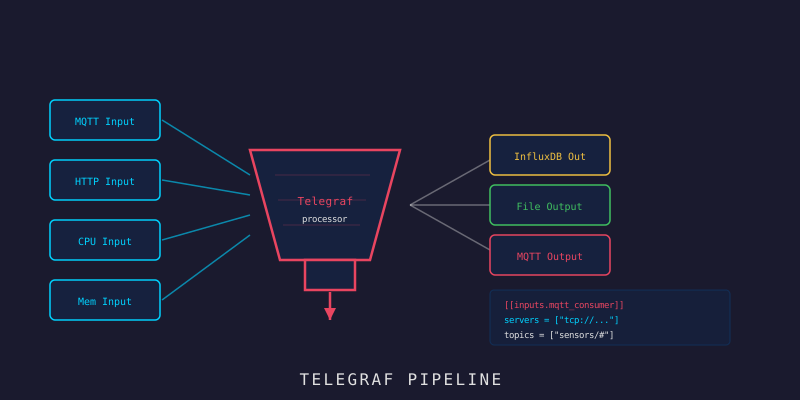
Telegraf json_v2 + Flux Query: สายพานข้อมูล IoT
Telegraf json_v2 + Flux Query: สายพานข้อมูล IoT
สวัสดีน้องๆ! พี่โชว์มาแล้ว วันนี้เราจะประกอบ “สายพานส่งข้อมูล” ที่ทำให้ payload จาก sensor ไหลเข้า InfluxDB 2.7 โดยอัตโนมัติ — แล้วต่อด้วยฝั่ง “อ่านออก” ด้วย Flux query ที่ Go backend สร้างให้แบบปลอดภัย มาลุยกัน! (ง •̀_•́)ง
Branch:
step-08-telegraf→ ต่อยอดถึงstep-09-alertingRepo: kangana1024/showkhun-workshop
ก่อนลุย: ทำไมเราถึงต้องการ Telegraf?
ลองนึกภาพ น้องเปิดร้านกาแฟ มีลูกค้า (sensor) เดินเข้ามาสั่งตลอดเวลา ถ้าน้องไม่มีพนักงานรับออเดอร์ น้องก็ต้องวิ่งรับเองทุกโต๊ะ — นั่นคือการเขียน consumer code รับข้อมูลจากทุก sensor เอง
Telegraf คือ “พนักงานรับออเดอร์มืออาชีพ” ที่รับข้อมูลจาก MQTT, แกะ JSON, ปั้นข้อมูล แล้วเขียนลง InfluxDB — ทั้งหมดแค่แก้ config ไฟล์เดียว ไม่ต้องเขียน code
ทำไมถึงสำคัญ?
- ไม่ต้องเขียน consumer code เอง ลดความผิดพลาด
- Config-driven — ทีมที่ไม่ใช่ dev ก็แก้ได้
- มี plugin ให้เลือกเยอะมาก รองรับทุก use case
- จัดการ batching, back pressure และ retry ให้อัตโนมัติ
เกร็ดจากของจริง: ในโปรเจกต์นี้ Telegraf ทำหน้าที่ ingestion แบบ “pure config” คู่กับ Go backend ที่ ingestion แบบมี logic — (ตอนที่แล้ว เราอธิบายว่าทั้งคู่เขียนคนละ measurement เลยไม่ตีกัน) ส่วนการ “อ่าน” ข้อมูลออกไป frontend เป็นหน้าที่ของ Go backend ที่ยิง Flux ล้วนๆ
สิ่งที่น้องๆ จะได้จาก workshop นี้
- เข้าใจ flow ข้อมูลจาก MQTT → Telegraf → InfluxDB 2.7 ทั้งหมด
- ตั้งค่า
mqtt_consumersubscribe topicdevices/+/telemetry - ใช้ json_v2 parser แกะ
fields/tagsจาก payload แบบ dynamic - ดึง
device_idจาก topic path ด้วยtopic_parsing - ปั้นข้อมูลด้วย processor:
rename,converter,enum - เขียนออกด้วย output
influxdb_v2(token / org / bucket) - สร้าง Flux query แบบ bounded/ปลอดภัยใน Go เพื่ออ่านข้อมูลออก REST API
ภาพรวม: สายพานข้อมูลของเรา
เปรียบ Telegraf เป็นโรงงาน มี “สายพาน” หลายช่วง:
graph LR
    A[📡 MQTT<br/>devices/+/telemetry] -->|input| B[mqtt_consumer]
    B -->|json_v2| C[raw_telemetry]
    C -->|rename| D[telegraf_sensor_data]
    D -->|converter + enum| E[ปั้น field/tag]
    E -->|output| F[(💾 InfluxDB 2.7<br/>bucket: iot_workshop)]
Note: processor แต่ละตัวใช้
namepassกรองเฉพาะ measurement ที่ตัวเองรับผิดชอบ เหมือนสายพานโรงงานที่แต่ละสถานีทำงานเฉพาะผลิตภัณฑ์ของตัวเอง
Payload ที่เราจะรับ
โปรเจกต์นี้ใช้ payload รูปแบบเดียวกันทั้งฝั่ง Telegraf และ Go backend — topic คือ devices/<device_id>/telemetry และ body เป็น JSON หน้าตาแบบนี้:
{
  "fields": { "temperature": 25.5, "humidity": 60.2 },
  "tags":   { "location": "room-a" },
  "timestamp": "2026-03-26T10:30:00Z"
}
จุดสำคัญ: timestamp เป็น optional — payload จะมีหรือไม่มีก็ได้ (เดี๋ยวจะเห็นว่าทำไม config ถึงต้องระวังเรื่องนี้เป็นพิเศษ)
Step 1: Agent Settings — จังหวะการ flush
ทำไม ต้อง tune ส่วน [agent]? เพราะค่า default ออกแบบมาแบบ general ไม่ได้เจาะ IoT ที่ sample ทุกไม่กี่วินาที เราเลยตั้ง batch/buffer/flush ให้พอดี
จาก infra/telegraf/telegraf.conf:
[agent]
  interval = "10s"
  round_interval = true
  metric_batch_size = 1000
  metric_buffer_limit = 10000
  flush_interval = "10s"
  # กระจาย flush ไม่ให้หลาย agent กระแทก InfluxDB พร้อมกันทุก tick
  flush_jitter = "2s"
  # sensor ระดับวินาที ไม่ต้องละเอียดถึง sub-second
  precision = "1s"
  omit_hostname = true
เรื่อง flush_jitter: ค่า 2s นี้สำคัญ! ถ้า agent หลายตัว flush พร้อมกันทุก 10 วินาที InfluxDB จะโดน spike load กระชากเป็นจังหวะ การใส่ jitter ทำให้แต่ละ instance flush เหลื่อมกันเล็กน้อย เหมือนจัดคิวรถออกจากลานจอด ไม่ให้ทุกคันออกพร้อมกัน
Step 2: MQTT Consumer + json_v2 Parser
ทำไมต้อง json_v2?
parser แบบเดิม (json) แกะ payload ซ้อนๆ ได้ลำบาก ส่วน json_v2 เก่งเรื่องอ่าน object/array แบบ dynamic และ map ไปเป็น tag/field ได้ตรงๆ ในโปรเจกต์เราใช้ความสามารถนี้อ่าน ทุกค่าใต้ fields โดยไม่ต้องระบุชื่อ field ทีละตัว
จาก infra/telegraf/telegraf.conf:
[[inputs.mqtt_consumer]]
  servers = ["${MQTT_BROKER_URL}"]
  topics = ["devices/+/telemetry"]
  qos = 1
  client_id = "telegraf-ingest"
  # ทิ้ง topic string ดิบหลังแกะ device id ออกแล้ว
  topic_tag = ""

  data_format = "json_v2"

  # แกะ device id จาก topic path: devices/<id>/telemetry
  [[inputs.mqtt_consumer.topic_parsing]]
    topic = "devices/+/telemetry"
    tags = "_/device_id/_"

  [[inputs.mqtt_consumer.json_v2]]
    measurement_name = "raw_telemetry"

    # อ่านทุก leaf ใต้ "fields" แบบ dynamic → กลายเป็น InfluxDB fields
    [[inputs.mqtt_consumer.json_v2.object]]
      path = "fields"

    # ดึง tag ที่ cardinality ต่ำจาก "tags" object (optional = ไม่มีก็ไม่ reject)
    [[inputs.mqtt_consumer.json_v2.tag]]
      path = "tags.location"
      rename = "location"
      optional = true
    [[inputs.mqtt_consumer.json_v2.tag]]
      path = "tags.zone"
      rename = "zone"
      optional = true
    [[inputs.mqtt_consumer.json_v2.tag]]
      path = "tags.unit"
      rename = "unit"
      optional = true
    [[inputs.mqtt_consumer.json_v2.tag]]
      path = "tags.source"
      rename = "source"
      optional = true
เรื่อง
topic_parsing: ส่วนนี้เจ๋งมาก!tags = "_/device_id/_"แปลว่า “ช่องที่สองของ topic ให้กลายเป็น tag ชื่อdevice_id” — มันแกะdevices/sensor-01/telemetryออกมาเป็นdevice_id = sensor-01ให้อัตโนมัติ ไม่ต้องไป regex เอง
ทำไมไม่ผูก timestamp_path?
อันนี้เป็นกับดักที่โปรเจกต์จงใจหลบ — json_v2 ถ้าระบุ timestamp_path ไว้ มันจะ บังคับ ว่า payload ต้องมี timestamp เสมอ ถ้าไม่มีจะ reject ทั้งข้อความทิ้งเลย แต่ payload ของเรา timestamp เป็น optional เราเลย ไม่ผูก timestamp_path แล้วใช้เวลาที่ message มาถึง Telegraf แทน — robust กว่าสำหรับ pipeline แบบ near-real-time
อุปมา: เหมือนรับพัสดุที่บางกล่องไม่มีวันที่เขียนไว้ — แทนที่จะโยนกล่องนั้นทิ้ง เราก็ประทับวันที่ “ตอนรับ” ให้แทน งานยังเดินต่อได้
Step 3: Processor — ปั้นข้อมูลให้สะอาด
ทำไม Processor ถึงสำคัญ?
ผลไม้ดิบ (raw data) จาก MQTT ยังเอาไปใช้ไม่ได้ทันที ต้องผ่านสายพานแปรรูป: เปลี่ยนชื่อ (rename), คัด type (converter), จัดป้ายให้เป็นมาตรฐาน (enum) แล้วถึงพร้อมเก็บ
# 1) เปลี่ยนชื่อ measurement: raw_telemetry → telegraf_sensor_data
[[processors.rename]]
  namepass = ["raw_telemetry"]
  [[processors.rename.replace]]
    measurement = "raw_telemetry"
    dest = "telegraf_sensor_data"

# 2) บังคับทุก field เป็น float — กัน payload ที่ส่งค่ามาเป็น string
#    หรือเดี๋ยว int เดี๋ยว float ไม่ให้สร้าง field type ชนกันใน InfluxDB
[[processors.converter]]
  namepass = ["telegraf_sensor_data"]
  [processors.converter.fields]
    float = ["*"]

# 3) normalise tag "source" ให้เป็น enum คงที่ ค่าที่ไม่ map ตกไปที่ default
[[processors.enum]]
  namepass = ["telegraf_sensor_data"]
  [[processors.enum.mapping]]
    tags = ["source"]
    default = "device"
    [processors.enum.mapping.value_mappings]
      device = "device"
      gateway = "gateway"
เรื่อง converter float = ["*"]: อันนี้คือ “ตาข่ายกันพลาด” ที่สำคัญมาก — ถ้าวันหนึ่ง device ส่ง temperature มาเป็น 25 (int) อีกวันส่ง 25.5 (float) InfluxDB จะมองเป็น field คนละ type แล้ว reject ทันที การ cast เป็น float ทั้งหมดเลยกัน series พังได้ตั้งแต่ต้นทาง
Step 4: Output — เขียนลง InfluxDB 2.7
ทำไม output ชื่อ influxdb_v2 (ไม่ใช่ influxdb)?
เพราะ InfluxDB 1.x กับ 2.x คุยกันคนละแบบ! plugin outputs.influxdb (ไม่มี _v2) คือของ 1.x ที่ใช้ database/username/password — ส่วนเราเป็น 2.x ต้องใช้ outputs.influxdb_v2 ที่คุยด้วย token / org / bucket
[[outputs.influxdb_v2]]
  namepass = ["telegraf_sensor_data"]
  urls = ["http://influxdb:8086"]
  token = "${INFLUX_TOKEN}"          # ส่งทาง env ไม่ hard-code
  organization = "${INFLUX_ORG}"     # showkhun
  bucket = "${INFLUX_BUCKET}"        # iot_workshop
  content_encoding = "gzip"
จบ! สายพานฝั่ง “เขียนเข้า” ครบแล้ว — sensor publish ขึ้น MQTT → Telegraf แกะ + ปั้น → ลง bucket iot_workshop เป็น measurement telegraf_sensor_data
Step 5: ทดสอบ Pipeline ฝั่งเขียน
ยิง MQTT message จำลองด้วย mosquitto_pub:
# ส่ง telemetry จำลอง (topic มี device id อยู่ใน path)
docker exec showkhun-mosquitto mosquitto_pub \
  -h localhost \
  -t "devices/sensor-01/telemetry" \
  -m '{
    "fields": { "temperature": 26.8, "humidity": 65.2 },
    "tags":   { "location": "room-a" }
  }'
แล้วเช็คว่าเข้า InfluxDB จริงด้วย Flux (ผ่าน HTTP API) — token อ่านจาก infra/.env ไม่ต้องพิมพ์ลงคำสั่งให้ติด history:
# ดึงค่าจาก infra/.env มาก่อน (รันจาก root ของ repo)
set -a; . ./infra/.env; set +a
: "${INFLUX_TOKEN:?ยังไม่ได้ตั้ง INFLUX_TOKEN ใน infra/.env}"

curl -s --request POST http://localhost:8086/api/v2/query?org=showkhun \
  --header "Authorization: Token $INFLUX_TOKEN" \
  --header "Accept: application/csv" \
  --header "Content-type: application/vnd.flux" \
  --data 'from(bucket:"iot_workshop")
    |> range(start: -10m)
    |> filter(fn: (r) => r._measurement == "telegraf_sensor_data")
    |> limit(n: 20)'
Step 6: ฝั่ง “อ่านออก” — สร้าง Flux Query ใน Go
ตอนนี้ข้อมูลเข้าไปนอนใน InfluxDB แล้ว แต่ frontend ต้องการดึงออกมาแสดง ฝั่งนี้โปรเจกต์ ไม่ได้ให้ client เขียน Flux เอง (อันตราย!) แต่ให้ Go backend สร้าง Flux ให้จากพารามิเตอร์ที่ผ่านการ validate มาแล้ว
ทำไมต้องระวังเรื่อง Flux injection?
ถ้าเราเอาค่าจาก user (เช่น device_id) มาต่อ string ใส่ query ตรงๆ คนร้ายอาจแอบใส่ Flux เพิ่มเพื่อดึงข้อมูลที่ไม่ควรเห็น — เหมือน SQL injection แต่เป็น Flux เลยต้องมีด่านกรอง
package tsquery (backend/internal/tsquery/tsquery.go) ทำ 2 อย่าง: (1) validate ทุกค่าด้วย allow-list / regex และ (2) clamp ช่วงเวลา/จำนวน row ไม่ให้ query หนักเกิน นี่คือ allow-list ของ aggregate และ regex ของ identifier:
// aggregate ที่อนุญาตเท่านั้น (ชื่อ function ถึง inline ใน query ได้ปลอดภัย)
var fluxFn = map[Aggregate]string{
	AggregateMean:  "mean",
	AggregateMax:   "max",
	AggregateMin:   "min",
	AggregateSum:   "sum",
	AggregateLast:  "last",
	AggregateFirst: "first",
	AggregateCount: "count",
}

// identifier (device id, field, measurement) ต้องอยู่ใน charset ที่ปลอดภัย
var identRe = regexp.MustCompile(`^[A-Za-z0-9_.\-]+$`)
ฟังก์ชันสร้าง Flux จริง
หลังพารามิเตอร์ผ่าน validate แล้ว Request.Flux() จะประกอบ Flux pipeline ออกมา สังเกตว่าทุก identifier ถูกห่อด้วย fluxString() ที่ escape " และ \ เป็นด่านสุดท้าย:
// Flux ประกอบ request เป็น Flux script
func (r Request) Flux() string {
	var b strings.Builder
	fmt.Fprintf(&b, "from(bucket: %s)\n", fluxString(r.Bucket))
	fmt.Fprintf(&b, "  |> range(start: -%s)\n", fluxDuration(r.Range))
	fmt.Fprintf(&b, "  |> filter(fn: (r) => r._measurement == %s)\n", fluxString(r.Measurement))
	if r.DeviceID != "" {
		fmt.Fprintf(&b, "  |> filter(fn: (r) => r.device_id == %s)\n", fluxString(r.DeviceID))
	}
	if r.Field != "" {
		fmt.Fprintf(&b, "  |> filter(fn: (r) => r._field == %s)\n", fluxString(r.Field))
	}
	if r.Window > 0 {
		// fn มาจาก allow-list (validate แล้ว) inline ได้ปลอดภัย
		fmt.Fprintf(&b, "  |> aggregateWindow(every: %s, fn: %s, createEmpty: false)\n",
			fluxDuration(r.Window), fluxFn[r.Aggregate])
	}
	fmt.Fprintf(&b, "  |> sort(columns: [\"_time\"], desc: true)\n")
	fmt.Fprintf(&b, "  |> limit(n: %d)\n", r.Limit)

	return b.String()
}
Flux ที่ออกมาจะหน้าตาประมาณนี้ (เป็น pipeline |> ต่อกันไป — นี่แหละจุดต่างจาก InfluxQL/SQL):
from(bucket: "iot_workshop")
  |> range(start: -1h)
  |> filter(fn: (r) => r._measurement == "sensor_data")
  |> filter(fn: (r) => r.device_id == "sensor-01")
  |> aggregateWindow(every: 1m, fn: mean, createEmpty: false)
  |> sort(columns: ["_time"], desc: true)
  |> limit(n: 500)
อุปมา Flux:
from |> range |> filter |> aggregateWindowเหมือนสายพาน — ข้อมูลวิ่งผ่านทีละสถานี กรองทีละชั้น ต่างจาก SQL ที่เขียนเป็นประโยคเดียวจบ
Step 7: REST Endpoints สำหรับอ่านข้อมูล
backend/internal/handler/reading.go เปิด 2 endpoint อ่านข้อมูล (mount อยู่ใต้ /api/v1):
GET /api/v1/devices/:id/readings   # อ่านของ device เดียว (id มาจาก path)
GET /api/v1/sensors/query          # query รวมทั้ง bucket แบบ bounded
query params ที่รับ (จาก RawParams): measurement, device_id, field, range, window, aggregate, limit และ source=downsampled เพื่อสลับไปอ่าน bucket สรุป
# ดึงอุณหภูมิเฉลี่ยรายนาที ย้อนหลัง 1 ชั่วโมง ของ sensor-01
curl -s "http://localhost:8080/api/v1/devices/sensor-01/readings?\
field=temperature&range=1h&window=1m&aggregate=mean&limit=200" | jq

# query รวม ดึงจาก bucket downsampled (เก็บนานกว่า)
curl -s "http://localhost:8080/api/v1/sensors/query?\
measurement=sensor_data&range=30d&source=downsampled" | jq
response แต่ละ row มาจาก database.ReadingRow (backend/internal/database/influx_query.go) ที่ flatten Flux record ให้ใช้ง่าย:
// ReadingRow คือ 1 แถวของผลลัพธ์ query — projection แบนๆ ของ Flux record
type ReadingRow struct {
	Time  time.Time      `json:"time"`
	Field string         `json:"field"`
	Value any            `json:"value"`
	Tags  map[string]any `json:"tags,omitempty"`
}
เกร็ดความปลอดภัย:
bucketFor()ใน handler ไม่ยอมให้ client ระบุชื่อ bucket มั่วๆ — รับแค่source=downsampledเพื่อสลับไป bucket สรุปเท่านั้น นอกนั้นใช้ raw bucket เสมอ การอ่านเลยถูกขังอยู่ใน store ที่เรารู้จักเท่านั้น
Recap: สรุปสิ่งที่เราทำวันนี้
  [MQTT]──►[mqtt_consumer]──►[json_v2]──►[processors]──►[influxdb_v2]
     ╔══════════════════════════════════════════════════════════╗
     ║  ฝั่งเขียนด้วย Telegraf + ฝั่งอ่านด้วย Flux ครบแล้ว! \(^o^)/  ║
╚══════════════════════════════════════════════════════════╝| Component | รายละเอียด |
|---|---|
| mqtt_consumer | subscribe devices/+/telemetry, qos 1 |
| topic_parsing | แกะ device_id ออกจาก topic path |
| json_v2 object | อ่านทุกค่าใต้ fields แบบ dynamic |
| json_v2 tag | ดึง location/zone/unit/source (optional) |
| processor rename | raw_telemetry → telegraf_sensor_data |
| processor converter | cast ทุก field เป็น float กัน type ชน |
| processor enum | normalise tag source เป็น enum |
| output influxdb_v2 | เขียนด้วย token/org/bucket ลง iot_workshop |
| tsquery (Flux) | สร้าง Flux แบบ validate + clamp กัน injection |
| REST read API | /devices/:id/readings, /sensors/query |
Key Takeaway: Telegraf ทำให้เราไม่ต้องเขียน ingestion code เอง (แค่ config) ส่วนการอ่านข้อมูลออก เราสร้าง Flux จากฝั่ง Go ที่ validate + clamp ทุกอย่าง เลยทั้งยืดหยุ่นและปลอดภัยในคราวเดียว
Next Step
ตอนนี้ข้อมูลไหลเข้า-ออก InfluxDB ได้แล้ว ขั้นต่อไปคือทำให้ระบบ “เตือนเองได้” — เราจะสร้าง alerting engine เป็น Go (threshold / offline / anomaly) ที่ประเมินทุก reading ตอน ingest แล้วยิง webhook แบบ Slack-compatible!
- ก่อนหน้า: IoT Workshop #10: InfluxDB 2.7 Setup
- ถัดไป: IoT Workshop #12: Go Alerting Engine